

The short answer
AI agents that research and write reports come in two kinds. Chat tools such as ChatGPT deep research, Gemini Deep Research, Perplexity Deep Research and Claude Research take one question, run a series of searches and hand back a report. Workflow tools such as AI Agent run a written task on a schedule and save the output, then pause for your approval before anything goes out. Use a chat tool for a one-off deep dive. Use a workflow tool when you want the same report every Monday.
Last updated October 27, 2026.
What "deep research" means
A normal chatbot answer comes from one pass over its training data, with maybe a quick search on the side. Deep research loops instead. The agent plans the question, searches, reads the pages, works out what's still missing, searches again, and only then writes the report with citations. OpenAI describes its version as multi-step research that finds, analyzes and synthesizes online sources (OpenAI). Claude's help page says research "runs multiple searches that build on each other" (Anthropic).
The loop takes minutes instead of seconds, so you start it and go make coffee. Plan around that wait before you pick a tool. If you want the basics of how agents plan and use tools, read what are AI agents first.
The tools compared
These tools change fast, so check each vendor's page for today's limits before you commit.
| Tool | What you get | Typical runtime | Access | Recurring runs |
|---|---|---|---|---|
| ChatGPT deep research | A cited report you can download as Markdown, Word or PDF (Help Center) | 5 to 30 minutes, per OpenAI's launch post | ChatGPT plans, with usage that differs by plan (Help Center) | Scheduled tasks exist. The page doesn't say they run the full deep research mode |
| Gemini Deep Research (app) | A report from a plan you can edit first (Google) | Usually 5 to 10 minutes, longer for complex reports | All users, with higher daily limits on Google AI Pro and Ultra (Google) | Not documented on that page |
| Gemini Deep Research (API) | A report returned through the Gemini API, in preview (Google) | Most tasks within 20 minutes, 60 minutes at most (Google) | Pay as you go. Google estimates roughly $1 to $3 for a typical task on the standard agent (Google) | You schedule it yourself with your own code, because the agent runs in the background and you poll for the result |
| Perplexity Deep Research | A report you can export to PDF or a document (Perplexity) | Most tasks in under 3 minutes, though a response can take around 4 to 5 minutes (Help Center) | Free with a daily limit, more for Pro, as stated at launch | Perplexity's changelog says Pro and Enterprise users can automate recurring research reports |
| Claude Research | A researched answer from the web and your connected tools (Anthropic) | Not stated by Anthropic | Same usage limits as normal conversations, which research can use up faster (Anthropic) | Not documented on that page |
| AI Agent | Saved run output or tickets, from a task you write | You set the task. Each run appears in Recent runs | Start is $49 and Pro is $149, with approval before external actions | Yes. Schedule or event triggers |
Some details don't fit in a table cell.
- ChatGPT proposes a research plan you can edit and lets you restrict the search to chosen sites. It uses connected apps for read actions only, per the Help Center.
- Gemini lets you pick sources such as Gmail and Drive, and you can deselect Google Search to limit the research to them (Google).
- The Gemini API agent supports remote MCP servers but not structured output (Google).
- Claude can use tools from your connectors during research without asking for approval each time (Anthropic). That's convenient, and it's also a good reason to read the report before you forward it to anyone.
One-off research versus a recurring report
The chat tools assume a person is sitting in front of them: you ask, wait around and read the answer. That suits a competitor deep dive, a vendor comparison or a first draft of a market overview.
A recurring report is a different job. Nobody asks for it. It shows up in the same place at the same time and in the same shape, so you can set this week next to last week. It needs a schedule first, and several chat tools now offer some form of one, as the table shows. It needs a fixed output format next. Last comes a review step, since a report that goes out unread every Monday will definately go out wrong sooner or later.
If your recurring job is narrow, such as a weekly look at competitor changes, AI agents for automated market research shows how to scope the question. If you aren't sure whether you need an agent or plain rules, AI agents vs traditional automation tools covers the split.
What to check before you trust a report
OpenAI and Google both warn about accuracy, and you should take them at their word. OpenAI's launch post says deep research can sometimes hallucinate facts or make incorrect inferences, may struggle to tell authoritative information from rumors, and can fail to convey uncertainty accurately (OpenAI). Google tells developers to review the citations the agent returns. It warns that an uploaded file can hide text that manipulates the output, and that the agent may process malicious web pages (Google).
Use five checks on any report from any tool:
- Open three of the cited links and confirm they say what the report claims.
- Look for numbers with no source next to them.
- Check the dates. A report can quote a pricing page that has since changed.
- Ask which sources it couldn't reach.
- Separate what the sources say from what the tool concludes.
For where a person should step in on an automated run, read human-in-the-loop AI agents.
A worked example: a weekly category brief in AI Agent
Say you want a short brief every Monday on what changed in your category. Here's how the setup goes in AI Agent, using the steps in the Autopilot guide.
- In Workflows, click New, then Autopilot.
- Name it something like "Weekly category brief".
- In What should happen?, write the question, the sources to use, the result you expect and when the agent must ask for review.
- In Who does the work?, choose an agent.
- Under Trigger, choose On a schedule, then set the repeat, the time and the timezone.
- In What should it produce?, choose Save the run output or Create tickets.
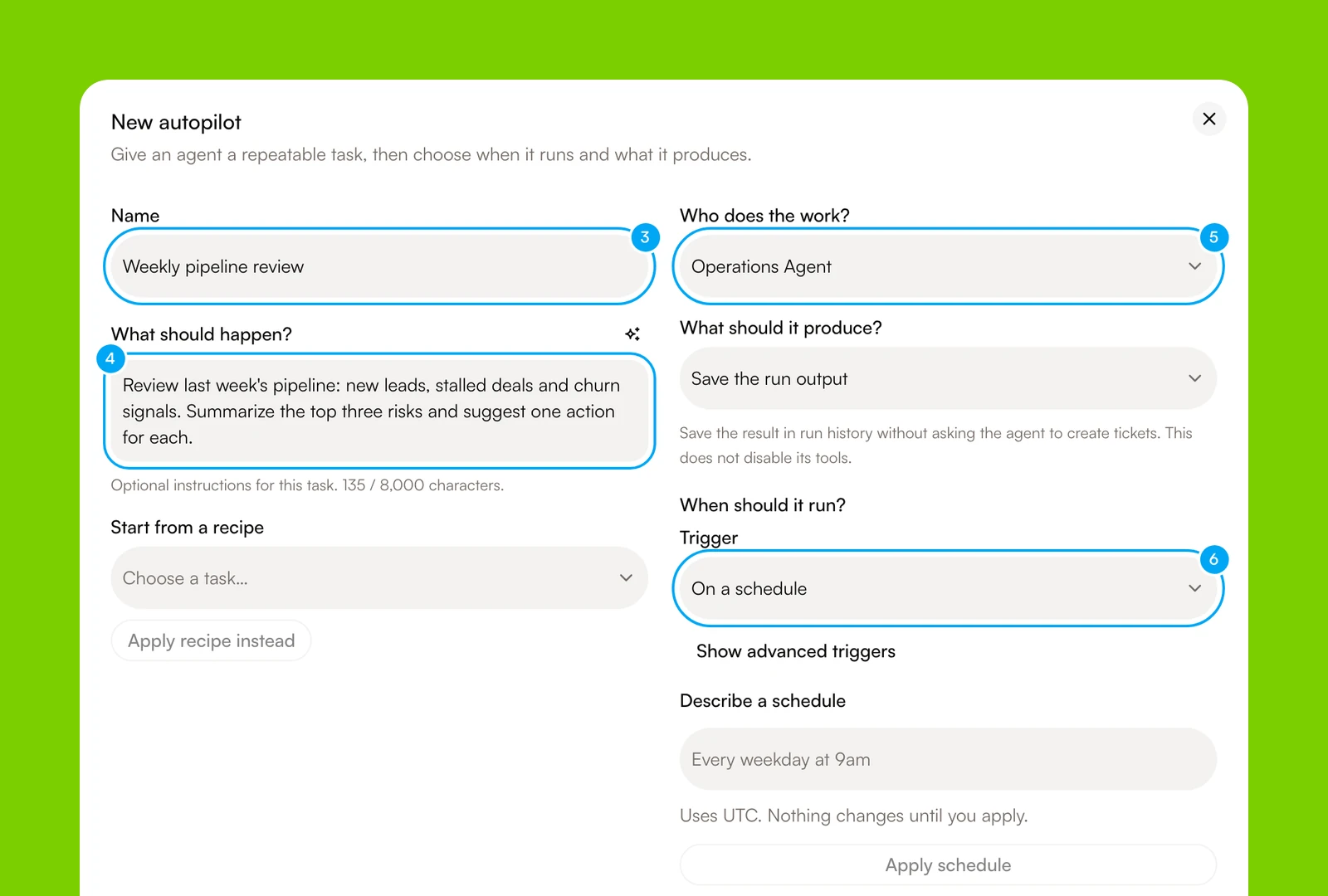
A new Autopilot starts paused. Switch it to Active, click Run now once, and read the run in Recent runs before you trust the schedule. Do it before the first real Monday, not during it. AI Agent pauses an Autopilot after 10 failed runs in a row, so a broken source doesn't keep failing quietly.
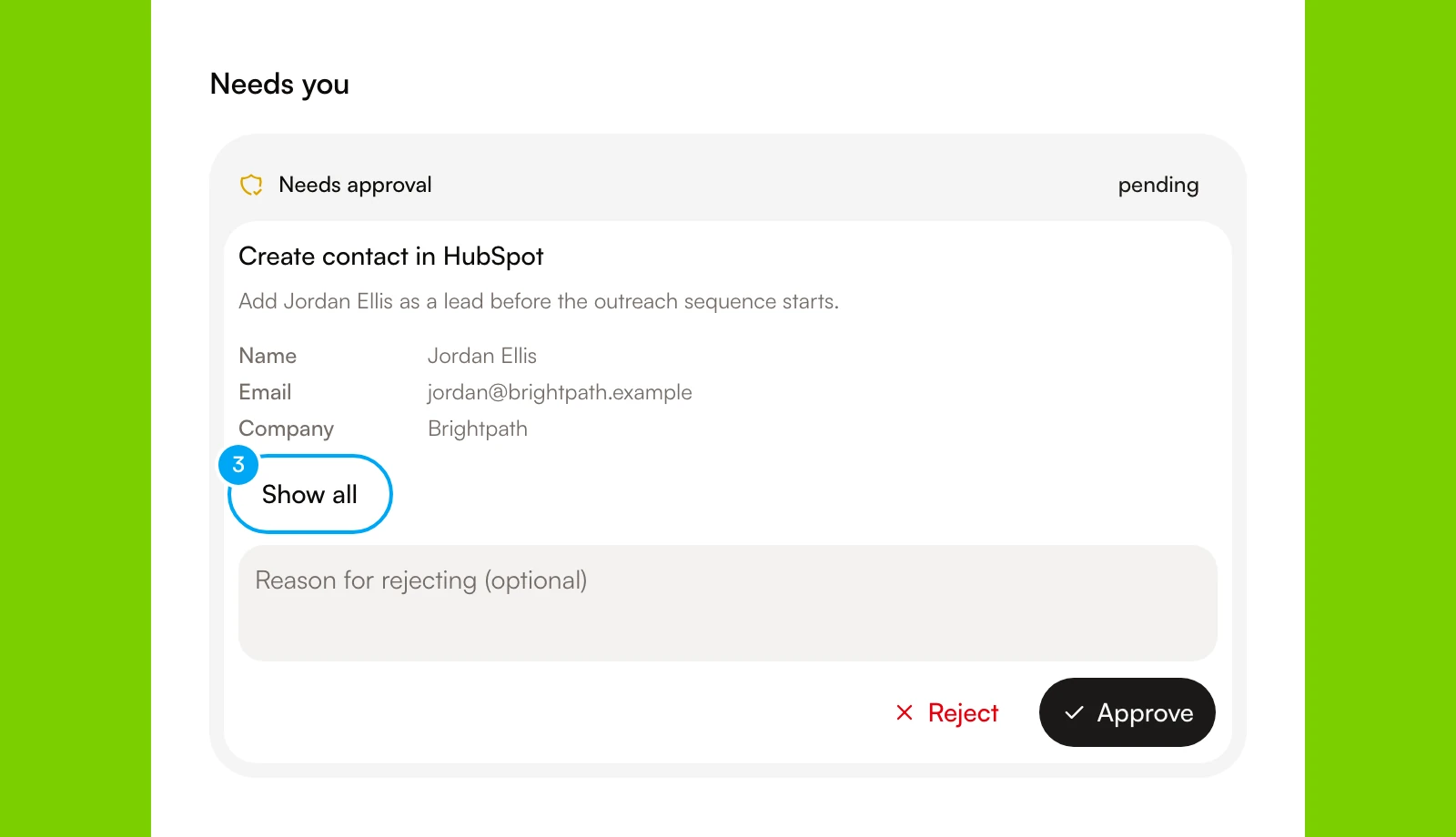
Each action the agent proposes in a connected app waits for you. An approval card shows the provider, the account and the proposed fields, and nothing runs until you click Approve.
AI Agent has 50 connections with 6,581 tool actions between them, so the brief can draw on your own tools as well as the open web. It meters tool actions from a credit pool. Connections and seats aren't metered. For a research task with several known steps, you can build a workflow with an approval block instead of an Autopilot (build and test a workflow). Browse templates for a starting point, and see pricing for the plans.
If you only need a deep dive now and then, a chat tool is simpler and you don't need a workflow product at all.
Build or buy
You can build this yourself. The Gemini API agent runs in the background and you poll for results, so a short script plus scheduler would produce a weekly report. You get full control of the format and the destination. You also own the retries, the storage and the review step, which is the part people forget. Buying a workflow tool gives up some of that control in exchange for a schedule, run history and approvals you don't have to write. For how the categories differ, see AI agent platforms compared. For the bigger picture of agents that plan and act, see what is agentic AI.
If you want the deep research product that started this category, OpenAI launches ChatGPT deep research covers what it does and what has changed since launch.
Frequently asked questions
Which AI agent tools can research information and create reports automatically?
ChatGPT deep research, Gemini Deep Research, Perplexity Deep Research and Claude Research each search the web and write a report from one question. For reports that repeat on a schedule and wait for approval, use a workflow tool such as AI Agent. Perplexity and ChatGPT also offer scheduled tasks, so check their pages for what a scheduled task can run.
What is the difference between deep research and a normal chatbot answer?
A normal answer comes from one pass. Deep research plans the question, searches and reads many pages, loops until the gaps close and then writes a cited report. It takes minutes, so you start it and come back.
Can these tools run research on a schedule?
Some can. ChatGPT has scheduled tasks and Perplexity has recurring tasks, but the vendor pages don't say every scheduled run uses the full deep research mode. Test one run first. In AI Agent, an Autopilot runs on a schedule you set and saves its output for review.
How accurate are AI research reports?
They can be wrong. OpenAI says deep research can hallucinate facts and misjudge sources, and Google tells developers to check the citations. Open the cited pages, check the dates and treat the report as a draft until a person has read it.
How much do automatic research reports cost?
It depends on the tool. ChatGPT and Gemini fold research into their plans with limits that differ by plan. The Gemini API is pay as you go, and Google estimates roughly $1 to $3 for a typical task on the standard agent (Google). AI Agent's Start plan is $49 and Pro is $149.